Flight school integrations
MyLog can connect with supported flight school systems so eligible students can import flight records directly into their logbook.
In MyLog 2.6.0, FAMS integrations were expanded for AZAL, Karatay University, and ATILIM University flight schools. The Add Integration screen was also redesigned to make supported integrations easier to find and start.
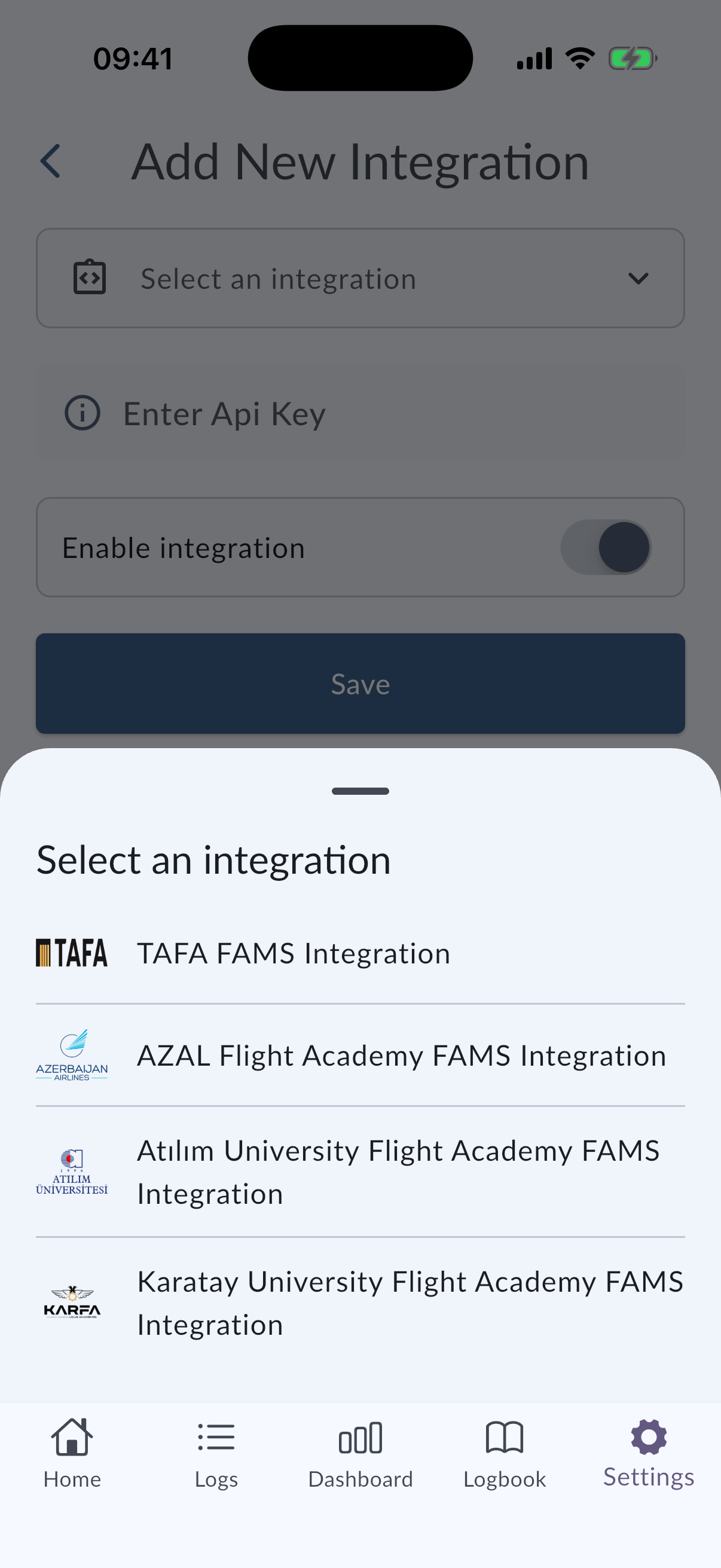
Supported flight schools
Supported schools in this release include:
- AZAL flight school
- Karatay University flight school
- ATILIM University flight school
Availability depends on the school, integration status, and whether your account is eligible to connect that source.
Flight school integrations are available only for supported schools and eligible users. If your school is not listed, contact MyLog support or your school administrator before trying to connect.
Add an integration
- Open Settings.
- Open Integrations or Add Integration.
- Choose your supported flight school integration.
- Follow the connection steps shown in MyLog.
- After the integration is connected, review imported records before relying on them in your logbook.
Import records from FAMS
After a supported FAMS integration is connected, MyLog can bring available flight records into your logbook.
Imported data may include flight information provided by the school system. Always review imported records after the import completes, especially dates, aircraft, airports, crew, and times.
Troubleshooting
If you do not see your school or cannot connect:
- Confirm that your school is supported.
- Confirm that you are using the correct MyLog account.
- Check your internet connection.
- Contact support if the integration should be available but does not appear.
If imported data looks incomplete, review the source system first, then contact support with the integration name and the affected records.